Sinabis Horus. Track the hours. See the value.

Sinabis Horus is the software for time tracking and billing in law firms and consultancies. It carries client work from the logged hour to the paid invoice: log time, book expenses, issue e-invoices, follow payments. With a dashboard, a voice assistant and an app for the road.
From the logged hour to the paid invoice.
Every invoice goes out as an e-invoice: a ZUGFeRD PDF with embedded invoice data under EN 16931, and for public-sector clients an XRechnung 3.0 with a validated Leitweg-ID.
- 01
Log time
Book hours per client: in the table, in the calendar or by voice. Horus turns every entry into an amount with the client's hourly rate.
- 02
Book expenses
Court fees, travel, translations: expenses go to the client, with the receipt attached right there.
- 03
Issue the invoice
The wizard collects a period's unbilled hours and expenses and creates a draft. It is issued only when you decide.
- 04
Follow the payment
Record incoming payments. Horus derives the invoice's status from them and shows what is open and since when.
On the computer too, at every desk.
In the browser Horus shows the full view: time entries as a table, the calendar, invoices with their preview. Phone and computer work with the same data on your server.
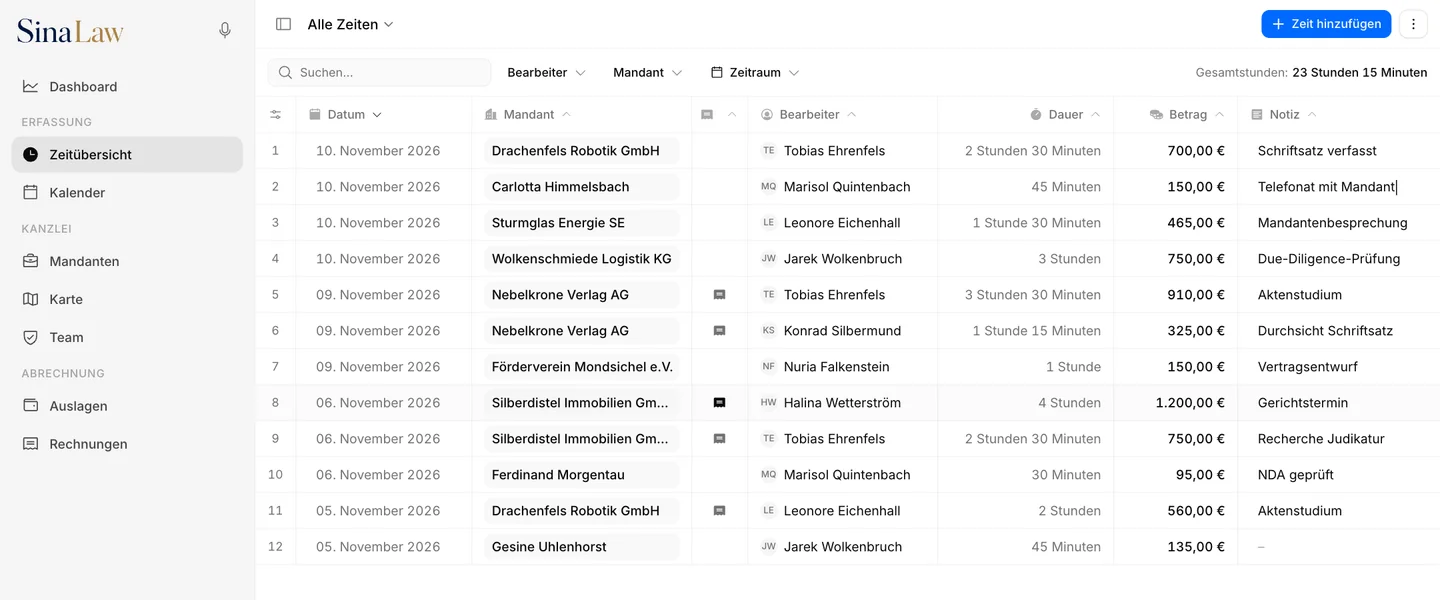
Time tracking per client: in the table, in the calendar, by voice.
Time overview
Every entry in one table, editable right in its row. Billed entries are marked and lead to their invoice.
Calendar
The week at a glance: every time entry as a block, coloured by client. Gaps and overlaps show immediately.
Find a client
One search field for all clients, the same in times, calendar and invoices: type a few letters, pick, carry on.
Mine or all
Whoever manages the firm moves with one switch between their own times and everyone's. Times, expenses and invoices export to an Excel or CSV file.
Billing by the hour: from the draft to the e-invoice.
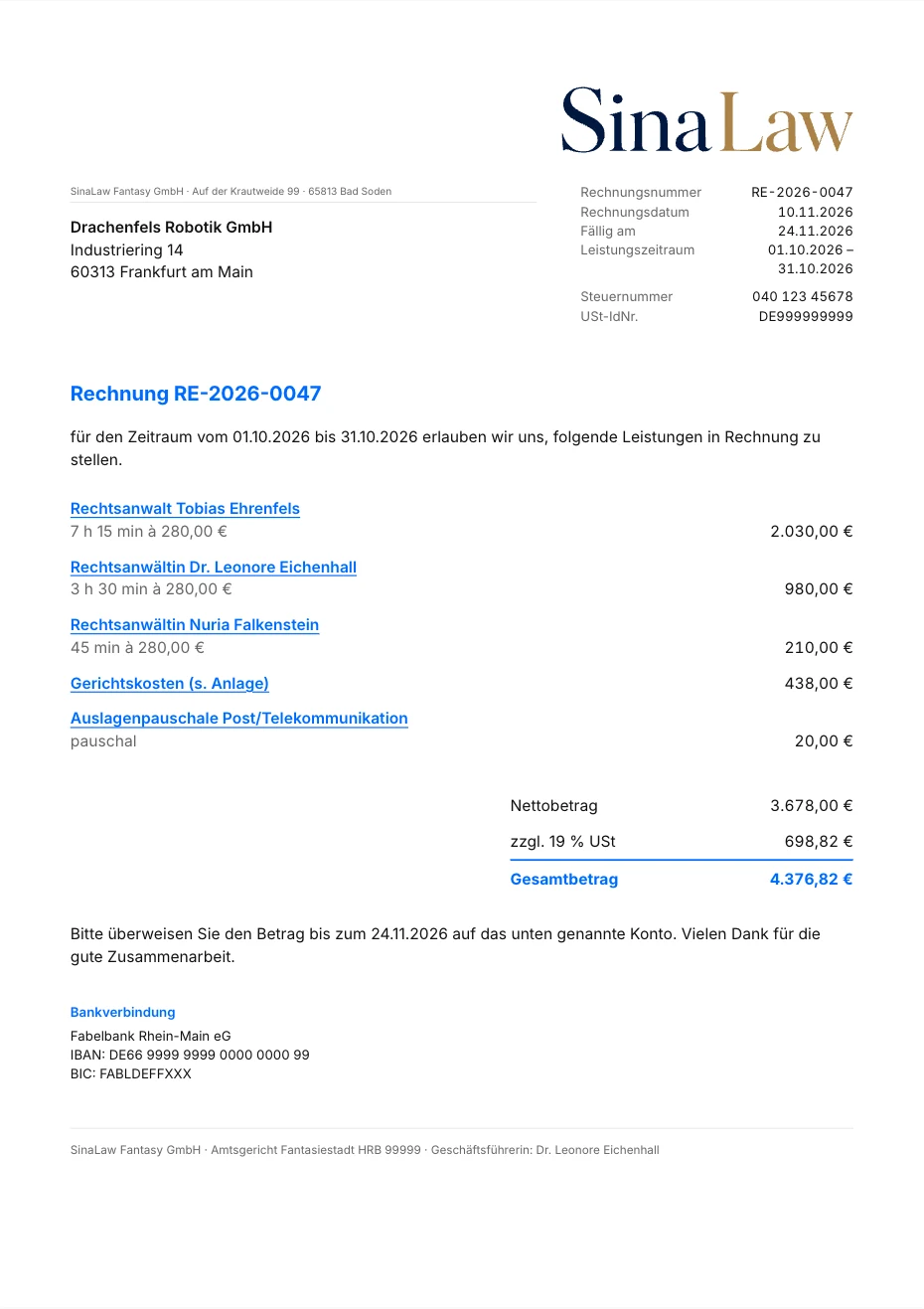
Pick the client and the period, then check the line items: hours, additional items and expenses. The result is always a draft, never an invoice issued by accident.
E-invoicing included
Every issued invoice is an e-invoice: a PDF with embedded invoice data to EN 16931 (ZUGFeRD / Factur-X). For public-sector clients Horus produces an XRechnung.
Issued means unchangeable
An issued invoice can no longer be changed. A correction is made by cancellation: a document of its own with its own number, and the hours become billable again.
Statement of services
The invoice sums the hours per person. The statement of services behind it lists every entry with the short code of the person who did the work and sums per code.
Your template
Logo, invoice colour, font size, columns and texts are set in the template. Several templates are possible.
Expenses and receipts in one place.
Booked like hours
Expenses belong to the client and go onto the invoice, in the same wizard as the hours. Billed expenses are locked and show their invoice number.
Receipts by drag and drop
Drop a PDF or a photo onto the expense, done. Preview and thumbnail show at once what was uploaded.
Receipt with the invoice
You choose per receipt whether it goes along with the invoice. The line then refers to the attachment.
Hours, revenue and open items at a glance.
The dashboard shows hours and revenue over time and the hours per client and per person, for a day, a week, a month, a year or a range of your choice. Plus: what is open and since when.
Open items
One tile gives the sum of all open invoices, one card splits it by age: not due, 1–30, 31–60, 61–90 and over 90 days.
For you or the firm
Everyone sees their own hours. Administrators switch to the whole firm and also see revenue and open items there. Every figure is compared with the period before.
Try Horus in your firm.
Hours end up on sticky notes, in spreadsheets and in memory. Horus turns them into invoices that are issued and paid. Try the live demo or talk to our team about Horus for your office.

Available Monday to Friday, 9:00 to 18:00 (CET).
Made for law firms and teams.
Horus is multi-user from the ground up: invite your team, assign roles and work on shared clients while every hour stays attributable.
Everything about a client
Master data, timesheet, hourly rates, access, invoices and expenses in one place. You change details right where they are.
Access per client
Every client has an owner who shares it with colleagues. Who has access shows in the head of the client's page and can be set when the client is created.
Roles & permissions
Invite users by e-mail and assign roles: user, administrator, system administrator. Everyone sees what they need, sensitive settings stay protected.
Short codes & avatars
Every user has a short code that appears in the statement of services, and a picture of their own or a built-in avatar.
Time tracking by app: Horus on the phone.
Horus has a phone view of its own for every area: a dock at the bottom, swipe gestures, forms that come up from below. The apps for iOS and Android show exactly this view.
Your server, your app
The app connects to your firm's Horus server. On first start you enter its address.
Always up to date
The interface comes from your server. Every new feature is there without updating the app.
Voice widget
On the iPhone a widget on the home screen leads straight into voice mode.
Book time by voice: tell Horus what to do.
In voice mode you book time, record expenses or create an invoice draft without opening a form. Horus asks when something is missing, repeats what it understood and answers out loud.
Confirm first, then book
Horus repeats every action with client, date and duration. Nothing is written before your yes.
Your firm's endpoint
Speech and language model run through the endpoint your firm enters, for example a model in your own building. The firm switches the assistant on and decides which model sees the data.
A draft stays internal
Voice only creates invoice drafts, nothing is issued. A draft never goes to a client.
Dictate instead of typing
You speak the note for a time entry. Horus puts the text into the field.
Outlook appointments in the calendar.
Every user connects their own Microsoft 365. Outlook appointments appear as a layer of their own in the calendar, and one click turns an appointment into a time entry.
Read only
Horus reads your appointments and changes nothing in Outlook. Your firm switches the connection on, it runs through your own Microsoft 365.
Times in your own calendar
The other way round, the booked times are available as a personal calendar feed to subscribe to.
Sinabis Horus at a glance.
- What for
- Time tracking and billing by the hour for law firms and consultancies
- Billing
- Hours, expenses and additional items; draft, invoice, cancellation, payments, open items
- E-invoice
- ZUGFeRD / Factur-X (PDF with invoice data to EN 16931), XRechnung, XML
- Interfaces
- DATEV posting batch (optional), Microsoft 365 with the Outlook calendar, calendar feed (ICS), export to Excel and CSV
- Devices
- Browser on the computer, a phone view of its own, apps for iOS and Android
- Languages
- German and English
- Operation
- German data centers, your own infrastructure on request
- Not included
- Case files, deadlines, beA and billing under the RVG fee schedule: Horus runs alongside your practice management software and does not replace it
Frequently asked questions
What we get asked most often about this topic. If your question is missing, write to office@sinabis.com.
Sinabis Horus is software for time tracking and billing in law firms and consultancies. It records hours and expenses per client, turns them into invoices as e-invoices (ZUGFeRD, XRechnung) and follows payments and open items.
For law firms and consultancies that bill by the hour and record hours per client and per employee. Roles and shared views are built for teams, not single seats.
Yes, per client, and more than one. Every time entry keeps the rate it was booked with: a new rate does not change old entries.
Yes. Every issued invoice is a PDF with embedded invoice data to EN 16931 (ZUGFeRD / Factur-X). For public-sector clients Horus produces an XRechnung, and the invoice data is also available as an XML file.
No. Horus bills by time spent: recorded hours times the hourly rate, plus expenses and additional items. A fee calculation under the RVG is not included.
To the litigation cost calculatorHorus exports the DATEV posting batch of the issued invoices as a file. The export is optional and is switched on in the settings. Payments and expenses are not part of the file.
No. Horus covers time tracking, invoices and payments. Case files, deadlines and beA are not part of it, Horus runs alongside the practice management software you already have.
Horus has a phone view of its own that runs in the phone’s browser. The apps for iOS and Android show this view and connect to your firm’s Horus server.
To the endpoint your firm enters itself, for example a language model in your own building. The assistant stays off until your firm switches it on and enters an endpoint. Before that Horus sends nothing.
Yes. Once your firm switches the connection on, every user connects their own Microsoft 365. Horus only reads the appointments, shows them in the calendar and turns an appointment into a time entry with one click.
In German data centers. For firms that must keep client data on their own premises, we work out operation on your own infrastructure.
Yes. We set up a trial account with sample data so you can check roles and reporting against your own workflow.