The Permission Iceberg: What Your Workplace AI Can See That You Can’t
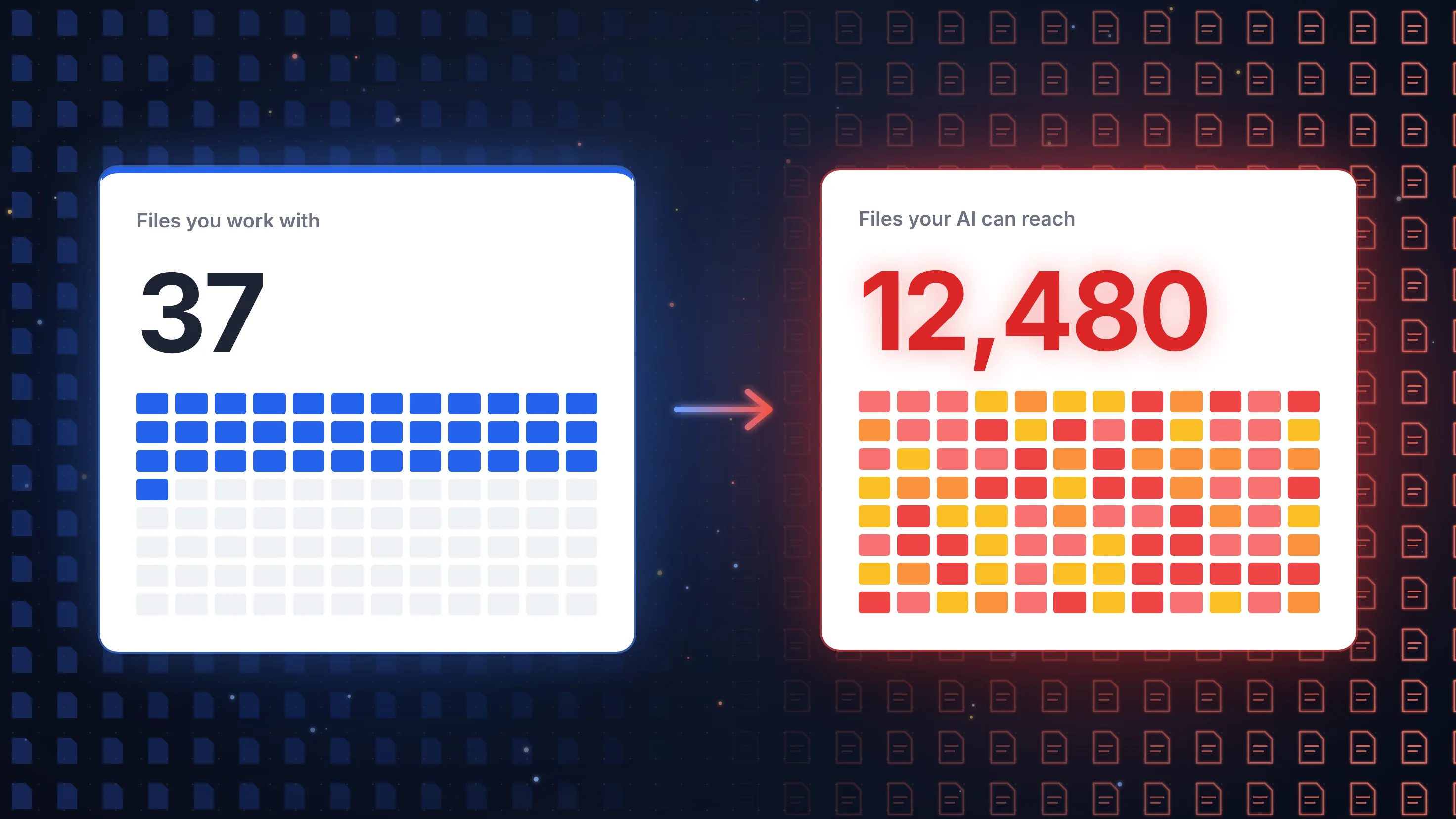
Workplace AI does not break your access rules. It follows all of them, including the ones nobody remembers setting. Before you switch it on, find out what sits below the waterline.
It is a Tuesday afternoon. A team lead at a mid-sized firm has just been given the new AI assistant built into the company’s office software. She starts with something harmless: “Summarise what we have planned for next year’s team budget.”
The answer arrives in seconds. It is clear, well-structured and accurate. It also lists the current salary of everyone in her department, taken from a spreadsheet in an HR folder she did not know existed, let alone that she could open.
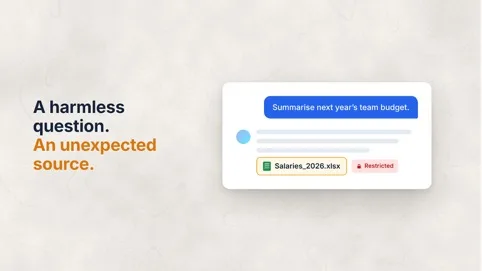
Nobody hacked anything. No rule was broken. The AI did exactly what it was built to do: search everything she has access to and give her the best possible answer. The problem is what “everything she has access to” really means, and that is why workplace AI permissions deserve a closer look before any rollout.
In short: Workplace AI permissions are inherited from your file permissions. AI assistants built into cloud office software can search and summarise every file a user is technically allowed to open, not only the files they normally work with. After years of broad sharing, inherited folder rights and forgotten links, this leads to AI oversharing and far more data exposure than anyone intended. Before rolling out workplace AI, organisations should check their permissions, or choose an AI that only works with the documents a user deliberately hands it.
I. Workplace AI Permissions: The Part of the Iceberg Nobody Looks At
Every organisation has two versions of its file permissions: the one people believe in, and the one that actually exists.
The first is simple. HR files belong to HR. Client matters belong to the team handling them. Board papers belong to the board. The second has grown over years, one convenient decision at a time:
- Inherited rights: a folder is shared with a whole department, and every subfolder created inside it later inherits that access, including the one someone used for performance reviews.
- Open sharing links: a link sent to an external adviser three years ago still works for anyone who has it, inside or outside the organisation.
- Company-wide groups: an “all staff” group added to a workspace for one announcement and never removed.
- Role changes: employees who moved departments often keep the access of every job they have ever had.
- Forgotten workspaces: sites from finished projects, still full of documents and still open to everyone who was ever a member.
IT security experts put it this way: what you can see of your permissions is only the tip of the iceberg.
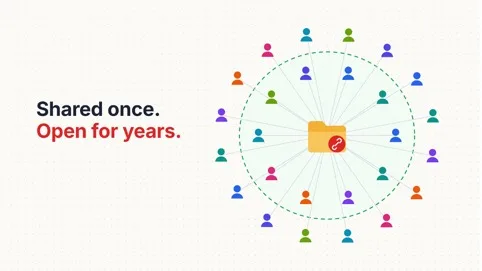
For years, this mess stayed mostly harmless for one reason: nobody went looking. A salary file four folders deep in a workspace you have never visited is technically accessible but practically invisible. Security professionals call this security through obscurity, and it was never meant to be a strategy.
II. AI Oversharing: Why AI Brings Everything to the Surface
Workplace AI removes the “nobody went looking” part. To answer a question well, an assistant searches across emails, chats, shared drives and document libraries, picks out the most relevant passages and combines them into one answer. It respects permissions, but only the permissions that exist, not the ones you intended.
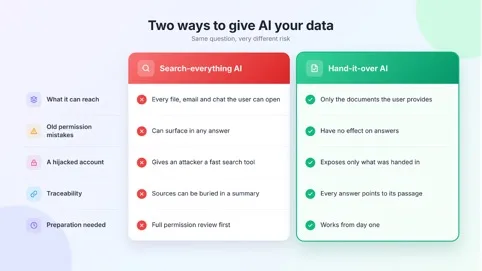
1. Search becomes discovery. Users no longer need to know a file exists. They ask a question, and the AI finds it for them.
2. Answers hide the source. A summary can contain a confidential figure without the user ever opening, or even noticing, the original file.
3. One account opens more doors. If an attacker takes over a single user account, the AI becomes a fast research tool for everything that account can reach. Attacks on cloud email accounts are already one of the most common ways in.
This effect is often called AI oversharing: the AI is not leaking data on purpose. It is sharing what your permissions already allowed.
The OWASP Top 10 for Large Language Model Applications lists Sensitive Information Disclosure among the leading risks of AI systems and recommends strict access controls as a countermeasure. Its entry on vector and embedding weaknesses calls for permission-aware data stores. In plain terms: an AI is only as safe as the permissions underneath it.
The timing matters. According to Bitkom, 57% of German companies now use AI, up from 36% a year earlier, and 45% of those AI users worry that company data could fall into the wrong hands. Many organisations are rolling out AI faster than they are cleaning up the permissions it relies on.
Your AI will never be more careful with your data than your permissions are.
III. Why It Matters for Law Firms, Banks and Public Bodies
For most organisations, an AI that surfaces a salary file is an embarrassing internal incident. For organisations that hold other people’s secrets, it can be far more serious.
- Law firms: client confidentiality is a professional duty, and many firms rely on internal information barriers so that a team acting for one client cannot see files from a related matter. An AI that searches the whole firm’s file storage can cross those barriers in a single answer, without anyone intending to.
- Banks and financial institutions: account data, credit decisions and insider information are subject to strict need-to-know rules. Under the EU’s Digital Operational Resilience Act (DORA), financial entities must limit access to information assets to what is required for legitimate and approved functions. Old, broad permissions are exactly what that rule is meant to prevent.
- Public bodies: authorities hold tax, social, health and police data about citizens. Access is tied to a clear purpose, and every disclosure has to be justifiable. Our post on GDPR-compliant AI for public institutions covers this in more depth.
For all three, the GDPR applies on top. Article 5 requires personal data to be protected against unauthorised processing, and Article 25 requires data protection by default: personal data should not be made accessible to an indefinite number of people without the individual’s intervention. An AI that can reach every file a user can technically open turns old sharing mistakes into an active data protection risk.
IV. How to Check Your AI Data Exposure Before You Switch It On
You do not need a perfect permission structure before using AI. But you should know what sits below the waterline. Six steps help you reduce AI data exposure:
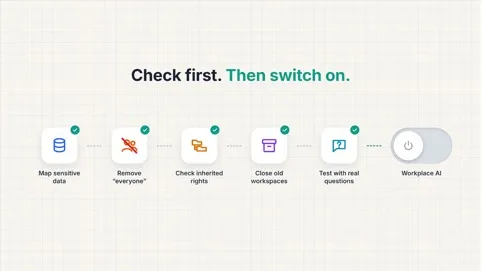
1. Map your sensitive data: list what must never appear in the wrong answer, such as salaries, personnel files, client matters, board papers, credit files or citizen records, and find out where it lives. Why it matters: you cannot protect what you have not located.
2. Remove “everyone” access: look for files and folders shared with company-wide groups or through links anyone can open. Why it matters: these are the biggest blind spots and the easiest to fix.
3. Check inherited rights: make sure sensitive subfolders do not simply inherit the access of the folder above them. Why it matters: one broad share at the top can open everything underneath.
4. Close old workspaces and old access: archive finished projects and remove rights people no longer need after a role change. Why it matters: every forgotten member is another account the AI answers for.
5. Test with real questions: before rollout, let a few users with ordinary rights ask deliberately sensitive questions, such as “What do my colleagues earn?” or “Which clients are we in dispute with?”. Why it matters:whatever comes back is your real exposure.
6. Decide what the AI may reach at all: some data should never be part of a company-wide AI search, whatever the permissions say. Why it matters: permissions answer “who may open this?”, not “should an AI read this?”.
The principle behind all six steps is an old one: least privilege. Every person, and every system, gets only the access it needs. Germany’s Federal Office for Information Security builds its guidance on identity and authorisation management on the same idea. If you want a quick starting point, our 10-minute test before using AI on client files works for any organisation, not only law firms.
V. The Alternative: An AI That Only Sees What You Hand It
Cleaning up permissions is worth doing anyway. But it is slow, it is never finished, and in a large organisation new sharing mistakes appear every day. There is a simpler way to take the iceberg out of the equation: change how the AI gets its information in the first place.
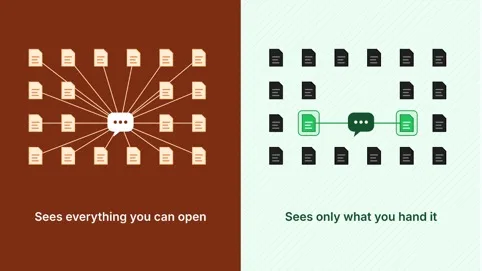
Most workplace assistants follow a “search everything you can open” model. The alternative is a “work only with what you are given” model:
Where the AI runs matters just as much. If documents are processed on infrastructure you control, sensitive files do not travel to a third party either. We compared the options in Three Ways to Process Sensitive Data Securely.
VI. How Sinabis Helps
Sinabis Assistant, developed by Sinabis Analytics GmbH, is built on the second model. It has no standing access to your file storage, mailboxes or chats. It works with the documents you give it, and nothing else.
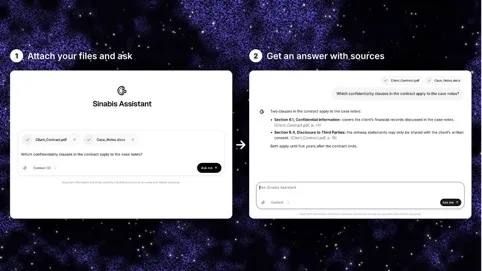
1. Only what you hand it: drag files into the chat and the Assistant analyses exactly those documents, from contracts of over 300 pages to mail archives and scanned files. Several files can be analysed together.
2. A source for every answer: each statement is backed by the exact passage in the document, with a direct jump into the original, so nothing surfaces without a visible origin.
3. Clear roles: permissions inside the Assistant are assigned centrally, from member to admin, in one click. Our post on working with your team in the same document shows how this looks in practice.
4. Your choice of where it runs: on Sinabox, the Assistant runs fully offline in your own server room, and no internet connection is needed after the initial setup. Alternatively, Sinacluster processes data exclusively in Germany and the EU.
5. A sound foundation: for organisations that want to tidy up the infrastructure underneath, X64 Systems supports network infrastructure, cybersecurity and secure hosting for law firms, auditors and compliance teams.
Frequently Asked Questions
Can a workplace AI assistant see files I have never opened?
Yes. AI assistants built into cloud office software usually search everything a user is technically allowed to access, not only the files they have opened before. If a file was shared too widely at some point, the AI can find it and use it in an answer. This is why workplace AI permissions should be reviewed before rollout.
Why does AI oversharing happen with files that were “hidden” before?
Most of those files were never really hidden, just hard to find. Inherited folder rights, open sharing links and company-wide groups gave many people access without anyone noticing. AI search removes the effort of looking, so files that were accessible but obscure suddenly appear in answers.
How can I check what an AI assistant could access in my organisation?
Start by mapping where sensitive data is stored, then look for files shared with company-wide groups or open links, check inherited folder rights and remove outdated access. Before rollout, test the assistant with deliberately sensitive questions using an account with ordinary rights. What it returns is your real exposure.
Is it GDPR-compliant to let an AI search all company files?
It depends on how access is set up. The GDPR requires appropriate protection against unauthorised access and data protection by default, meaning personal data should not be available to an indefinite number of people. If an AI can reach personal data that users should not see, that is a compliance risk. This is general information, not legal advice.
What is the difference between an AI that searches everything and one that works with uploaded documents?
A search-everything AI can reach every file, email and chat a user has access to, so old permission mistakes become visible in its answers. An AI that only works with uploaded documents, such as Sinabis Assistant, has no standing access to your systems. It can only answer from the files a user deliberately provides.
The question is not only who may open a file. It is what your AI can read on their behalf. Choose an AI that only sees what you hand it.
Planning an AI rollout and want to keep sensitive files below the waterline? Get in touch here. Or try the Sinabis Assistant demo and see how Sinabis protects client data and handles secure data processing.
→ Learn more: www.sinabis.com
Sinabis Analytics GmbH • X64 Forensic GmbH • X64 Systems GmbH