AI for Legal Teams 2026: Rules, Risks, and GDPR-Compliant AI Explained

On this page
In short, law firms can use AI in 2026, but client data has to stay under their control. GDPR, § 43e BRAO and the EU AI Act set the rules, and AI assistants built into office software and AI agents add a new risk because they can reach every file your permissions allow. Private AI that runs on-premise, such as the Sinabox, is the safest route to GDPR-compliant AI for client files.
"Law firms that ignore AI in 2026 are not playing it safe; they are falling behind. The real question is not whether to use AI, but whether you are using it the right way."
AI is no longer something legal teams can put off thinking about. It is already being used inside law firms and legal departments across Europe to review contracts, summarize case files, search through thousands of documents in minutes and draft legal correspondence. The next wave is already here: AI assistants are moving into everyday office software, and AI agents that open files and send emails on their own are following close behind.
But here is the problem most firms are not talking about: the moment a lawyer uploads a client's file to an AI tool, they may be breaking the law.
Client confidentiality is the foundation of legal practice. Yet most AI tools on the market today are cloud-based, which means your client's sensitive data leaves your office, travels to a remote server somewhere and gets processed by a system you do not control. Inside Microsoft 365, the risk is harder to see: an AI assistant can surface any file a user can technically open, including files nobody meant to share.
This guide explains what legal teams need to know about AI in 2026, in plain language: what the key terms mean, what the rules say, how safe, GDPR-compliant AI systems are built and what your firm should do right now.
I. Before You Use AI: The Words You Need to Know
AI comes with a lot of technical language that can feel overwhelming. Here are the most important terms, explained in plain language.
Large Language Model (LLM): This is the type of AI that reads and writes text. It is what powers tools that summarize documents, answer legal questions and draft contracts. Think of it as an extremely well-read assistant that has processed millions of pages of text and can respond intelligently to questions. The catch: it needs data to work with, and in legal practice, that data is often confidential.
On-Premise AI (Private AI): This means the AI runs on computers inside your own office or building, which is why it is often called private AI. Nothing is sent to the internet. Your client's data never leaves your control. For legal teams, this is the gold standard and, in many cases, the simplest way to stay on the right side of the law.
Air-Gapped System: This goes one step further than on-premise. An air-gapped system is completely cut off from the internet; it cannot send or receive data from outside. It is the most secure option available, used in environments where data leaks would be catastrophic. For firms handling criminal cases or highly sensitive matters, this is worth considering seriously.
RAG (Retrieval-Augmented Generation): Do not let the name put you off. RAG simply means the AI searches through your own documents to find answers, rather than relying on general knowledge. So instead of the AI guessing, it reads your actual case files, contracts or legal library and gives you answers based on that specific material. It is more accurate and far more useful for legal work.
Hallucination: This is one of the biggest risks with AI in legal work. Hallucination is when an AI confidently gives you information that is simply wrong: a made-up court case, a law that does not exist, a contract clause that was never there. It sounds real, but it is not. Any legal team using AI must always verify AI-generated content before relying on it.
Vector Database: The technology that makes RAG work. It stores your documents in a way that lets the AI search by meaning, not just by keywords. So, if you ask "what are the payment terms in this contract?", it finds the right section even if those exact words do not appear. You do not need to understand how it works; just know that it makes AI significantly more useful for legal document work.
AI Agent: An AI agent goes one step beyond a chatbot. Instead of only answering questions, it carries out tasks on its own: it opens files, drafts and sends emails, updates records or starts workflows. Agents built on tools such as Microsoft 365 Copilot act with the permissions of the person using them, so every folder that person can reach, the agent can reach too.
Data Sovereignty and Data Localization: Data sovereignty means your data is subject only to the laws and controls you choose, not those of a foreign provider. Data localization means deciding where data is physically stored and processed, for example only in Germany or the EU. For law firms, both come down to one question: who could get access to client files, and under which law? Our guide to data sovereignty in Europe explains why this matters more than ever.
II. What the Rules Say
Legal professionals work in one of the most regulated environments in Europe. Here is what the current rules actually require when it comes to AI.
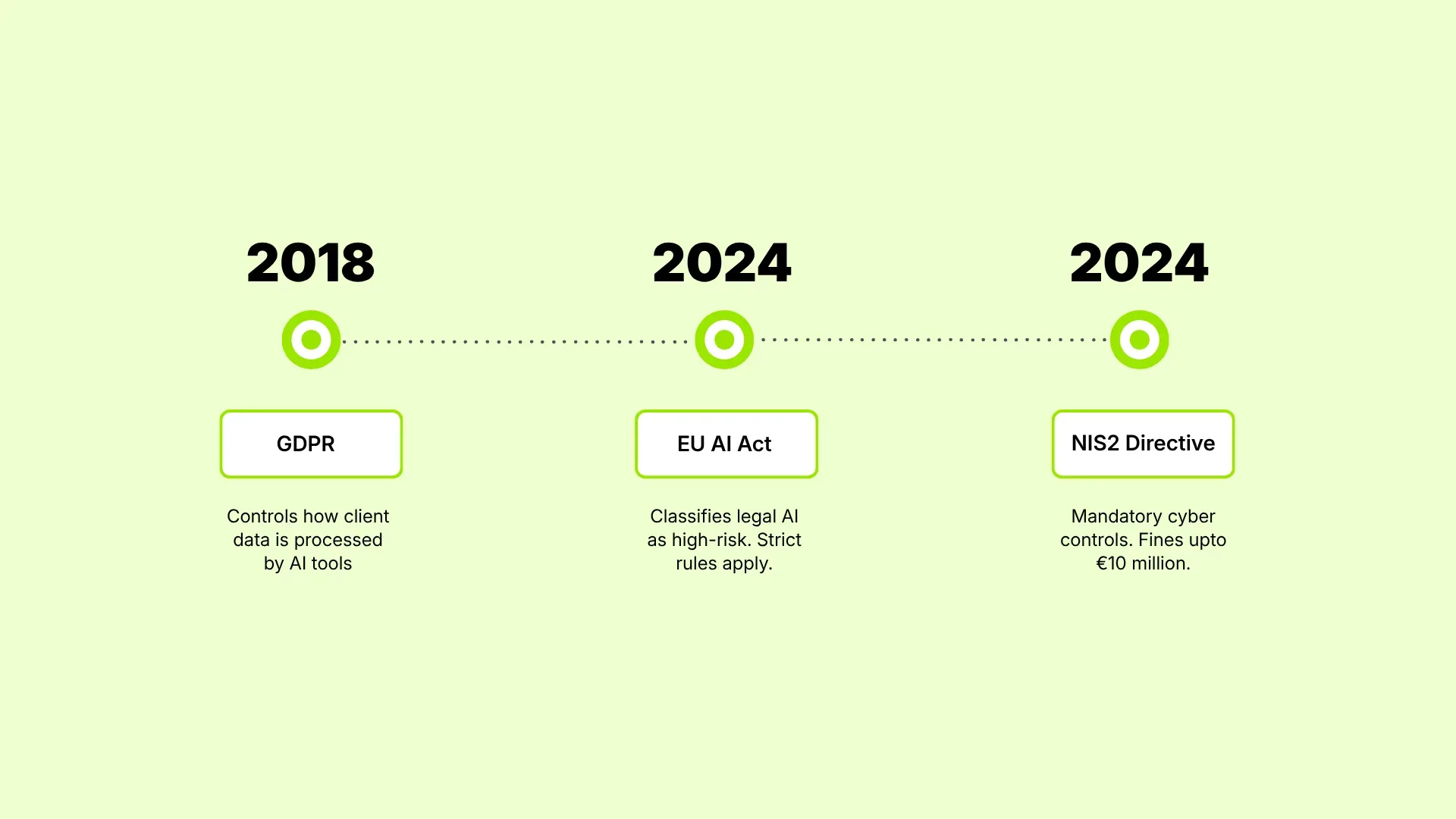
GDPR (The Data Protection Law): The General Data Protection Regulation sets strict rules on how personal data is handled. Article 9 protects special categories of data such as health information, and Article 10 covers data on criminal convictions and offences, both of which are everyday material in legal work. You cannot send this kind of data to a third-party platform without a solid legal basis and the right contracts in place. For many firms that use cloud AI tools casually, that basis is missing. This means many firms may already be breaking GDPR without realizing it.
The EU AI Act: The EU AI Act came into force in 2024 and applies in stages. Bans on certain AI practices and the duty to build AI literacy among staff have applied since February 2025, and transparency rules for AI-generated content followed in August 2026. AI used in the administration of justice is classed as high-risk and must be transparent, allow human oversight and be properly documented. Under the Digital Omnibus on AI, these high-risk obligations now apply from 2 December 2027. That is no reason to wait: if your AI vendor cannot already show you how its system works and how it is documented, that is a red flag.
Professional Secrecy: Every lawyer in Europe is bound by professional secrecy, the obligation to keep client information strictly confidential. In Germany, this is written into § 43a of the Federal Lawyers' Act (BRAO) and backed by criminal law in § 203 of the German Criminal Code (StGB). § 43e BRAO does allow lawyers to use external IT and cloud providers, but only if the provider is carefully selected, bound to confidentiality in writing and given access only to what the task requires. Many cloud AI tools make these conditions hard to meet, because you cannot check where data goes, who can see it or whether it is used to train models.
NIS2 (The Cybersecurity Law): The NIS2 Directive had to be transposed by October 2024, and Germany's implementation law came into force on 6 December 2025. It applies to organizations in listed sectors above certain size thresholds and requires strong cybersecurity measures, including control over third-party software and AI tools. Fines can reach €10 million or 2% of global annual turnover. Many law firms are not covered directly, but their clients in banking, energy, health or the public sector are, and they increasingly pass these requirements on to their legal advisers. Read NIS2 six months in and our guide to zero trust for German mid-market firms for what this means in practice.
BSI IT-Grundschutz: For firms working with German public sector clients or government agencies, the BSI IT-Grundschutz framework sets the security standard. In practice, clients like these often expect AI systems that handle sensitive legal data to run on-premise or air-gapped, not in a public cloud.
III. How Safe Legal AI Actually Works
The difference between a safe AI setup and a risky one comes down to one question: where does the data go?
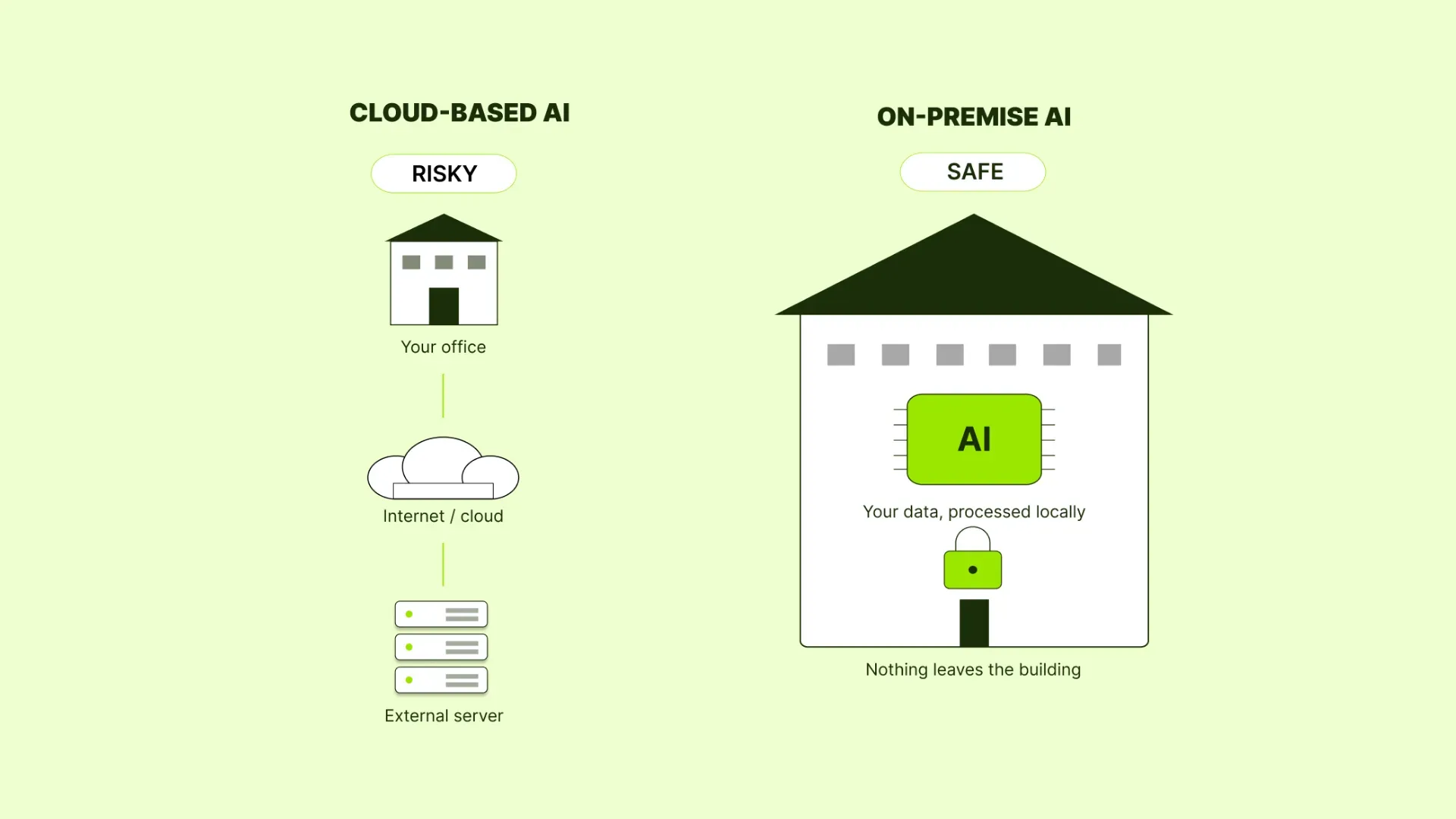
Cloud AI (The Risky Option): Most popular AI tools work in the cloud. You type something in, it goes to a server far away, gets processed, and the answer comes back. This is fast and convenient. But for legal work involving client data, it is not safe. The data leaves your control the moment you send it. Even if the vendor has strong security, you have no way to guarantee what happens to that data on their end.
Microsoft 365 Copilot and AI Agents (The Hidden Risk): Many firms first meet AI through Microsoft 365 Copilot. Copilot does not break your permissions; it uses them. It can find and summarize any SharePoint site, OneDrive folder or Teams chat a user can open, including the client folder that was shared with "everyone" years ago. Microsoft itself recommends fixing oversharing before rolling out Copilot and agents. In most firms, the permissions you can see are only the tip of the iceberg.
On-Premise AI (The Safe Option): With on-premise or private AI, everything stays inside your building. The AI model runs on your own hardware. Client data never travels anywhere. This is the most reliable way to guarantee confidentiality, meet GDPR requirements and honor your professional secrecy obligations.
The Hybrid Approach: Some firms use a mix: cloud AI or a private cloud for low-risk tasks like scheduling, billing or researching publicly available case law, and on-premise AI for anything involving client data. This works well, but only with a very clear policy about which data goes where and regular checks that the policy is followed. One accidental upload of a confidential file to a cloud tool, or one hijacked Microsoft 365 account in a business email compromise attack, is all it takes to create a serious problem.
How Sinabis Approaches This: The Sinabox from Sinabis GmbH is built specifically for environments where data security is not negotiable. It is a self-contained unit, hardware and software together, that runs entirely offline. With the Sinabis Assistant, legal teams get GDPR-compliant AI for document analysis, case work and search, with answers that point back to their sources and without any data ever leaving their network. It is designed to meet GDPR, the EU AI Act and BSI requirements out of the box.
IV. Who Is Responsible for What
Your Law Firm: You are responsible for making sure any AI tool you use complies with GDPR, professional secrecy rules and the EU AI Act. Saying "the vendor told us it was compliant" is not a defense. You need to verify this yourself, get it in writing and document your due diligence. When a client or regulator asks, evidence counts, not gut feeling.
Your AI Vendor: Under the EU AI Act, providers of high-risk AI must supply clear technical documentation and proof of compliance. Even when a tool is not high-risk, a serious vendor should be able to tell you where data is processed and who can access it. If they cannot or will not, do not sign a contract with them.
Bar Associations: The Council of Bars and Law Societies of Europe (CCBE) published its Guide on the Use of Generative AI by Lawyers in October 2025. Its message is clear: lawyers should not enter confidential or client-related information into generative AI tools, and every AI output must be checked independently. Professional obligations apply regardless of the technology used.
Data Protection Authorities: The German Federal Commissioner for Data Protection (BfDI) and the data protection authorities of the German states can investigate and fine law firms for GDPR violations. Their joint body, the Datenschutzkonferenz (DSK), has published guidance on AI and data protection that sets out what authorities expect from organizations using AI.
V. What Your Firm Should Do This Week
You do not need to change everything overnight. Moving from AI pilots to a firm that truly controls its AI starts with these steps:
Find out what AI tools your team is already using: Many lawyers are already using AI tools, often without formal approval. Do a quick audit, and include Copilot features and AI agents that may already be switched on in Microsoft 365. Ask your team. You may be surprised what you find.
Separate your data by sensitivity: Public legal research and administrative tasks can safely use cloud AI. Anything involving client data, case files or privileged communications cannot. Draw a clear line and make sure everyone knows where it is.
Check your Microsoft 365 permissions before Copilot does: Review who can open which SharePoint sites, Teams and OneDrive folders, and remove "everyone" links on client files. Do this before you switch on Copilot or AI agents, not after.
Ask your AI vendors the hard questions: Request their EU AI Act compliance documentation. Ask specifically: where is our data processed? Who has access to it? What happens if there is a breach? If they cannot answer clearly, that tells you everything you need to know.
Move client data to an on-premise solution: This is the most important step. For any AI use involving real client files, a private AI system that runs inside your own network is the most reliable way to meet GDPR and professional secrecy requirements.
Write an AI policy and document your decisions: Record which tools are approved, for which data and why. When a client, auditor or regulator asks, you can show evidence instead of relying on memory. Our 10-minute AI test for law firms is a good place to start.
Train your people: The biggest risk in most firms is not the technology. It is a well-meaning lawyer who pastes a client's email into AI because it is faster. Make sure your team understands why this matters and what the rules are; the EU AI Act already expects firms to build AI literacy among their staff.
Before You Close This Page
AI will make your legal team faster, sharper and better at serving clients. But only if you stay in control of it. The firms that will lead in 2026 are not the ones moving fastest; they are the ones moving most carefully, from AI pilots to a clear, documented way of working. GDPR, professional secrecy and the EU AI Act are not obstacles. They are the framework that keeps your clients and your firm protected.
Sinabis GmbH, based in Bad Soden am Taunus near Frankfurt, helps law firms and legal departments in Frankfurt, the Rhine-Main region and across Germany put GDPR-compliant AI and AI compliance into practice, on hardware they own.
Frequently Asked Questions
Does client data have to stay in Germany or the EU when a law firm uses AI?
Not always, but it is the safest choice. GDPR only allows transfers outside the EU with safeguards such as an adequacy decision or standard contractual clauses (Chapter V GDPR). For services provided abroad, § 43e(4) BRAO adds that lawyers may only give access to client secrets if the protection there is comparable to Germany's. Keeping data on your own hardware removes the question entirely.
Can an AI provider use client data to train its models?
For law firms, this should be ruled out. A provider that processes data on your behalf needs a data processing agreement under Article 28 GDPR and may only use the data on your instructions. Read the terms carefully: some services reserve the right to use inputs to improve their models in their standard versions.
Does a law firm need a data protection impact assessment before using AI?
Often, yes. Article 35 GDPR requires a data protection impact assessment when processing is likely to result in a high risk to the people concerned, for example when new technology is used with sensitive data. AI analysis of client files often meets these criteria. The assessment belongs before the first use, not after.
Should law firms tell clients when they use AI on their matters?
Transparency is the safe route. The CCBE's guide recommends that lawyers inform clients when they use generative AI and give them the chance to object. Many firms now cover AI use in their engagement letters, which is also a good place to explain how client data is protected.
For more information about Sinabis's secure AI and forensic solutions for legal teams: Get in touch here.
Explore more from Sinabis GmbH:
- Big Data Analytics: Sinabis Analytics GmbH
- Digital Forensics: X64 Forensic GmbH
- Managed IT Systems: X64 Systems GmbH
Sources: GDPR · EU AI Act · Digital Omnibus on AI · NIS2 Directive · BSI IT-Grundschutz · CCBE · BfDI · DSK · Microsoft